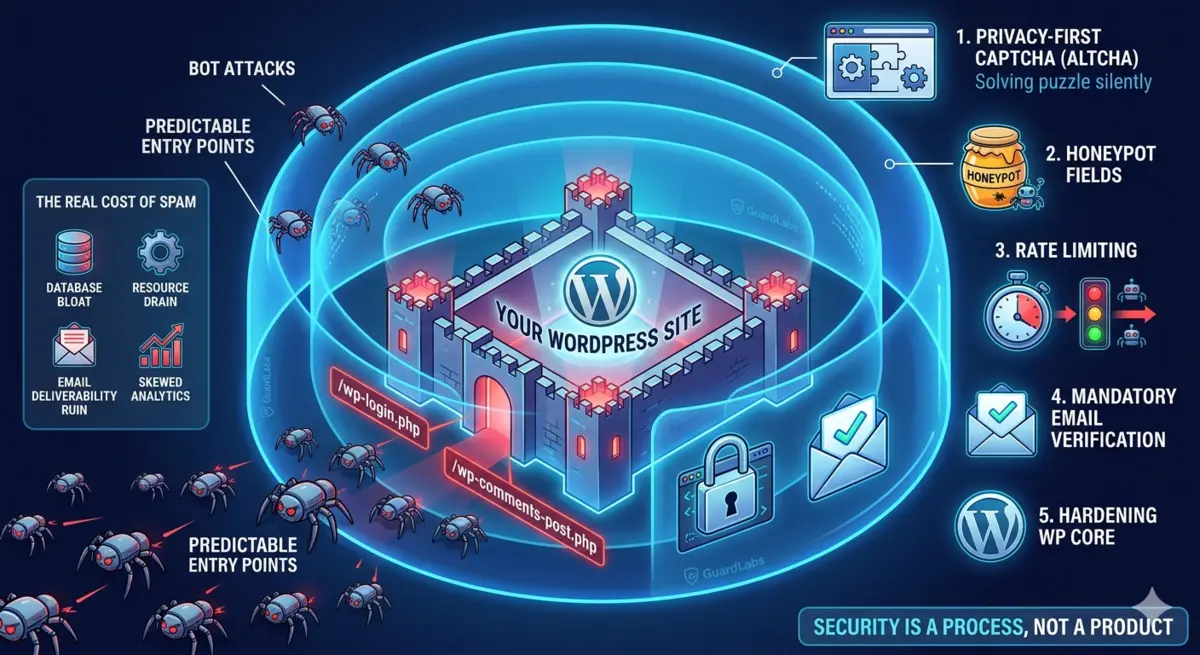
Why WordPress is a magnet for bots
WordPress powers over 40% of the web. While this massive market share makes it incredibly versatile, it also makes it the primary target for automated cyber threats. If you run a membership site, an e-commerce store, or a community forum, you have likely noticed a surge in fake accounts.
Bots target WordPress because its architecture is highly predictable. By default, every WordPress installation has the exact same entry points: /wp-login.php for logins, /wp-signup.php or wp-login.php?action=register for registrations, and /wp-comments-post.php for comments.
Bot operators write simple scripts to scan millions of IP addresses, locate these specific endpoints, and attempt to exploit them. Whether they are trying to brute-force admin credentials, inject SEO spam into your comments, or create thousands of fake user profiles, automated scripts are constantly knocking on your site’s digital doors. Relying on default settings is no longer a viable strategy for modern wordpress security.

The real cost of fake signups and spam
Many website owners treat wordpress bot signups as a minor annoyance—something to be bulk-deleted once a month. However, the underlying damage of unchecked wordpress spam registration runs much deeper:
- Database Bloat and Resource Drain: Every fake user registration creates new rows in your
wp_usersandwp_usermetatables. Over time, millions of spam rows slow down database queries, degrade site performance, and increase your hosting costs. - Email Deliverability Ruin (Subscription Bombing): Bots often register using real, scraped email addresses belonging to innocent people. When your site sends automated “Welcome” or “Verify your email” messages to thousands of non-consenting users, they mark your emails as spam. This destroys your domain’s sender reputation, causing your legitimate transactional emails (like invoice receipts) to land in your customers’ spam folders.
- Skewed Business Analytics: If 40% of your new signups are automated bots, your conversion rates, marketing metrics, and active user data are completely inaccurate, leading to poor business decisions.
- Security Vulnerabilities: A database cluttered with unverified users is a security hazard. If a bot successfully registers an account with contributor or author permissions, it can exploit unpatched plugin vulnerabilities to escalate privileges and deface your site.
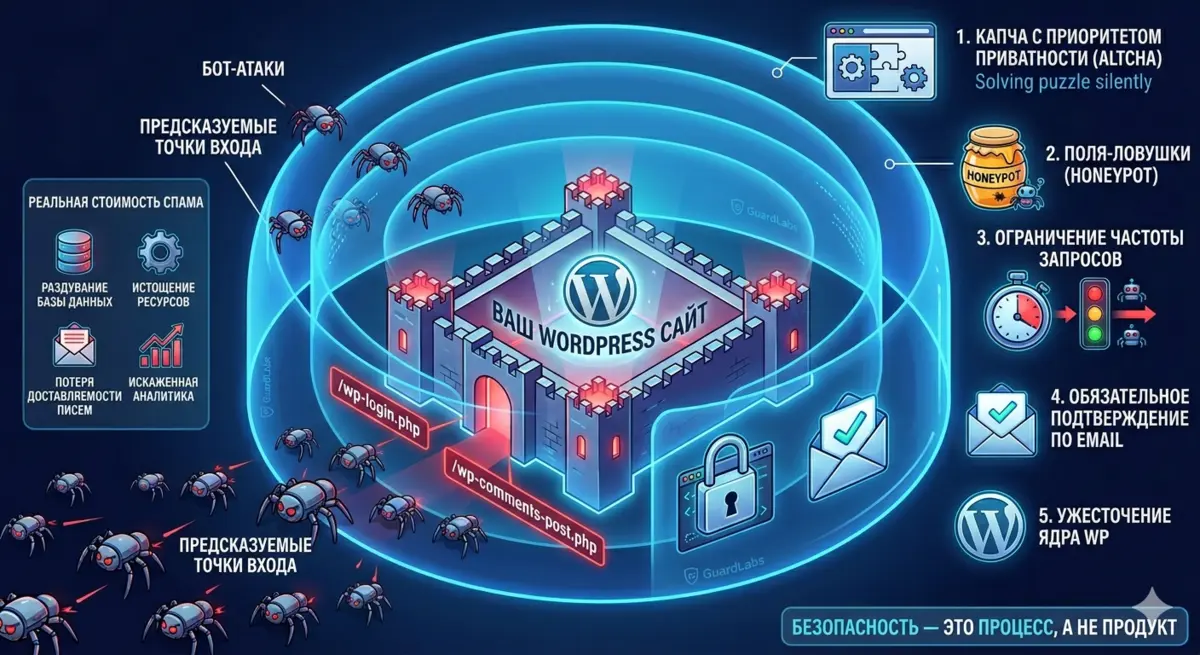
A layered, privacy-first defense
To stop spam registrations wordpress sites must move away from the outdated “one-plugin-fixes-all” mindset. A single security plugin cannot protect you from every vector. Instead, you need a defense-in-depth strategy that stops bots at different stages of their journey, all while respecting user privacy.
Here is how to build a modern, high-performance wordpress anti-fraud setup in five layers:
1. The Privacy-First CAPTCHA (Altcha)
For years, Google’s reCAPTCHA was the default choice to block bots. However, in 2026, reCAPTCHA is a privacy liability. It tracks user behavior, drops invasive third-party cookies, violates strict GDPR/ePrivacy regulations, and slows down page load times.
The modern alternative is Altcha, a self-hosted, open-source, and privacy-first wordpress captcha solution. Altcha uses a Proof-of-Work (PoW) mechanism. Instead of forcing users to click on traffic lights or solve puzzles, the user’s browser silently solves a complex cryptographic puzzle in the background before submitting the form.

* Why it works: It requires zero user interaction (improving conversion rates) and does not track user data. * Why self-hosted is best: By self-hosting Altcha, you keep 100% of your user data on your own servers, completely bypassing third-party tracking networks.
2. Honeypot Fields
Honeypots are invisible form fields designed to trick automated scripts. Humans cannot see these fields because they are hidden via CSS, so they leave them blank. Bots, which parse raw HTML, see the fields and automatically fill them out. If a hidden field contains any data upon form submission, your server instantly rejects the request. Honeypots are incredibly lightweight and catch the vast majority of simple, high-volume spam bots without bothering your real users.
3. Rate Limiting on Endpoints
Bots rely on speed. They attempt to register hundreds of accounts or submit dozens of comments per second. By implementing rate limiting on your login, registration, and comment endpoints, you restrict the number of requests a single IP address or subnet can make within a specific timeframe (e.g., maximum 3 registration attempts per minute). This effectively throttles brute-force tools and automated registration scripts.
4. Mandatory Email Verification
Never allow a registered user to access your site’s features immediately. Implement a strict double-opt-in workflow. When a user signs up, their account should remain inactive until they click a unique verification link sent to their email. This simple step stops bulk automated registrations from polluting your active user database and ensures that the email addresses provided are actually monitored.
5. Hardening the WordPress Core
Finally, reduce your attack surface by hiding predictable targets.
* Change your default login and registration URLs (e.g., move /wp-login.php to /secure-portal).
* Disable XML-RPC (xmlrpc.php) if you do not use the WordPress mobile app or Jetpack, as this file is frequently targeted for brute-force attacks.
* Keep your core, themes, and plugins updated automatically to close known security loopholes.
What one plugin can’t do (honest limits)
While a layered defense will block 99% of automated, high-volume bot traffic, it is important to understand the limits of standard security plugins.
If a human attacker is paid to manually register fake accounts on your site, or if they use highly sophisticated, headless browsers (like Puppeteer or Playwright) configured to mimic human mouse movements and solve Proof-of-Work puzzles, basic plugins will not stop them. Combating targeted, human-driven fraud requires advanced behavioral analysis, device fingerprinting, and custom Web Application Firewall (WAF) rules. However, for the vast majority of WordPress site owners, the layered setup outlined above is more than enough to restore peace and performance.
A practical checklist to ship this week
Ready to secure your site? Here is your step-by-step implementation plan:
- [ ] Audit your current setup: Deactivate invasive tracking captchas like Google reCAPTCHA.
- [ ] Deploy Altcha: Install and configure a self-hosted Altcha setup on your registration, login, and contact forms to protect user privacy.
- [ ] Add Honeypots: Enable hidden honeypot fields on all public-facing forms.
- [ ] Configure Rate Limiting: Use a security plugin or a Cloudflare WAF rule to limit requests to
/wp-login.phpand your custom registration endpoints. - [ ] Enable Double Opt-In: Set up an email verification plugin (like User Verification or Theme My Login) to keep unverified accounts inactive.
- [ ] Change the Login URL: Move your login page away from
/wp-login.phpusing a lightweight URL-rewriting plugin. - [ ] Disable XML-RPC: Block access to
xmlrpc.phpvia your.htaccessor Nginx configuration file.
Secure Your WordPress Site with GuardLabs
Don’t have the time or technical expertise to configure a self-hosted security stack? Let the experts handle it. GuardLabs offers professional, done-for-you WordPress anti-fraud services.
We will deploy a fully customized, self-hosted Altcha setup on your website for a one-time fee of $149, complete with ongoing care, real-time monitoring, and a comprehensive security audit of your entire WordPress ecosystem.
👉 Explore our Anti-Fraud Tiers & Get Started Today
Takeaway: Security is not a single product you install, but a continuous process of adding friction for attackers while keeping the experience seamless for your users.